Publisher Case Study: Ad Refresh the Multi-Device Revenue Boost
In part one of this series, we broke down how ExoClick’s Ad Refresh feature can drastically increase mobile ad inventory value. But what happens when you scale this optimization strategy across your entire platform? In this article we will examine a multi-device Publisher case study using Ad Refresh.
While mobile traffic offers massive scale, desktop traffic frequently delivers deep engagement durations and distinct behavioral patterns. To achieve true revenue optimization, top-tier publishers look at the bigger picture: a multi-device strategy. By implementing Ad Refresh on both mobile and desktop ad zones simultaneously, you maximize your monetization potential across all user screens.
A Quick Refresher: What is Ad Refresh?
Ad Refresh allows publishers to automatically rotate multiple ad creatives inside designated banner and native ad zones during a single end-user session. This strategy pairs beautifully with highly adaptable ad formats like Native Ads.
When combined with Ad Refresh, these responsive elements dynamically update based on time parameters, keeping your layouts clean, interactive, and highly competitive within ad network bidding environments. So let’s take a look at 3 case studies that used Ad Refresh.
Multi-Device Performance: 3 Comprehensive Case Studies
To evaluate how desktop and adaptive native environments react to accelerated rotation, we examined 3 distinct publisher case studies. All implementations shifted to an aggressive 30-second ad rotation timing strategy, comparing a 15-day pre-activation baseline against a 15-day post-activation window.
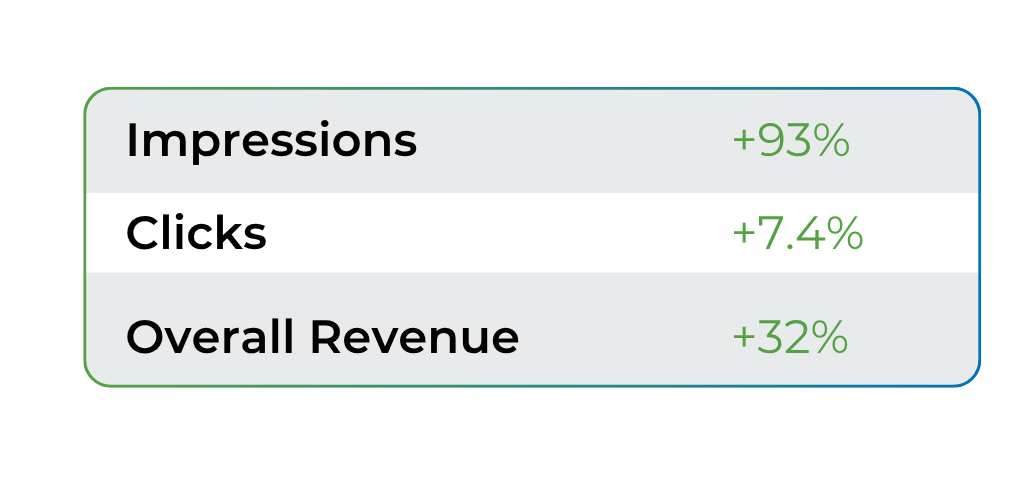
Multi-Device Publisher Case Study 1: Native NTV 1×2 Vertical Placements
The first publisher wanted to see how a multi-device, visually sleek native layout would perform under an accelerated refresh cycle. They enabled the 30-second Ad Refresh feature on their Native NTV 1×2 ad zones.
Multi-Device Publisher Case Study 2: Desktop Footer Native Placements
Our second publisher targeted standard desktop traffic by optimizing the often-underutilized bottom of the page. They activated the 30-second refresh cycle on their Desktop Footer Native ad zones to catch users right before they exited the site.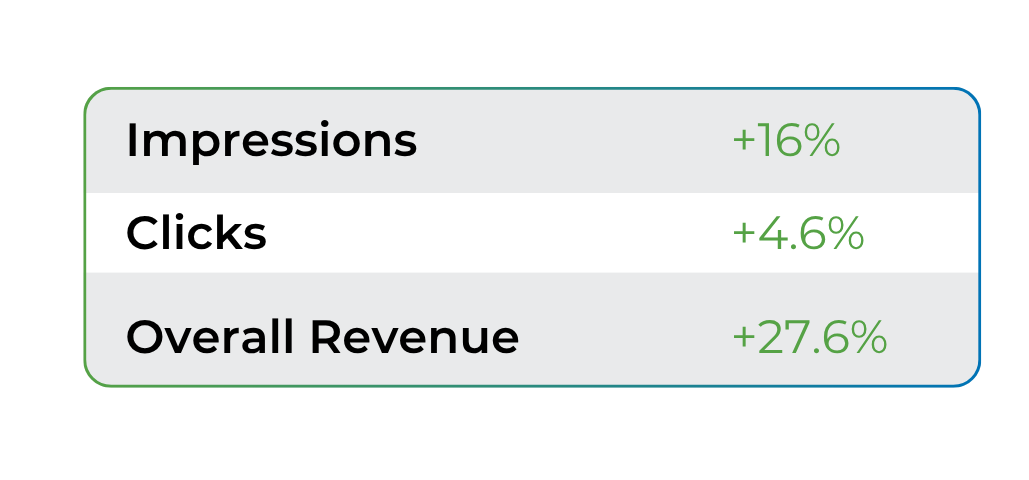
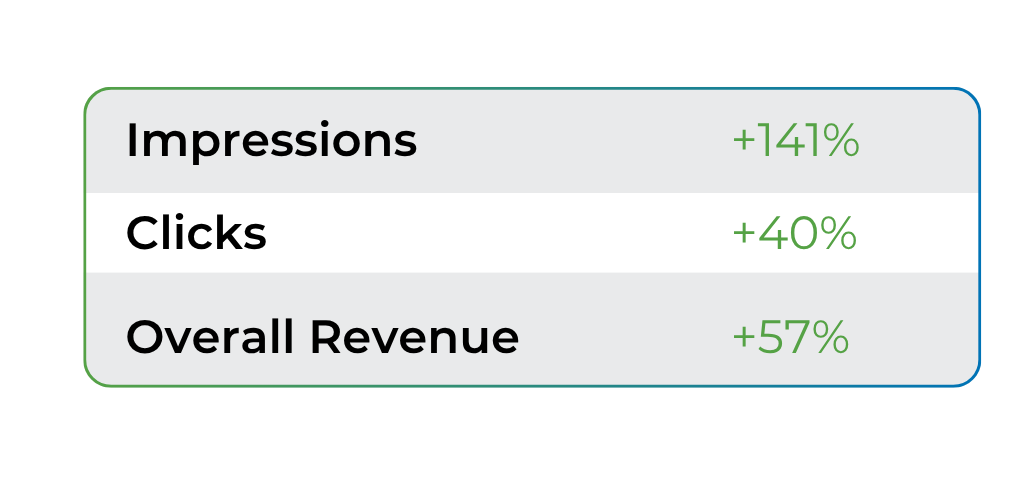
Multi-Device Publisher Case Study 3: Native 1×1 In-Content Placements
The final publisher wanted to test the impact of a fast refresh cycle integrated directly into the heart of their website’s text. They applied the 30-second strategy to their high-engagement Native 1×1 In-Content ad zones, capturing users when their attention was at its highest.
Best Practices: Advanced Cross-Device Implementation
While Part 1 covered the basics of mobile ad rotation, optimizing a multi-device ecosystem with a fast 30-second refresh cycle requires a more strategic, layout-driven approach:
- Tailor Refresh Rate to Layout: In-Content placements significantly outperform Footer placements, leading to greater impressions and revenue. Use a 30-second limit for Footer ads, as users navigate away quickly.
- Prevent Layout Shifts on Desktop: Sudden shifts are distracting. Use fixed aspect ratio boxes in your CSS for native formats to maintain a seamless user experience and comply with Google’s Core Web Vitals.
- Balance Impressions with Ad Fatigue: A rapid refresh cycle can lead to ad fatigue. Ensure a diverse pool of categories for your native ads to keep content fresh and maintain click-through rates.
- Data-Driven Strategy: Analyze user behavior to optimize your approach. If desktop users spend more time on pages, keep the 30-second refresh for desktop In-Content areas, while adjusting mobile zones for faster scrolling.
- Compatible with Multi-Format ad zones: You can use the Native Ad Refresh on Multi-Format zones, giving you even more ways to increase your ad zone revenue with ExoClick.
Conclusion
Whether your audience accesses your website via desktop or mobile devices, implementing ExoClick’s Ad Refresh is an excellent way to combat user ad fatigue and significantly expand your total ad inventory options. Serving fresh, relevant creatives keeps your zones highly competitive, driving up advertiser demand and maximizing your long-term yield.
Are you ready to unlock the full potential of your mobile traffic? If you need assistance with integration, ask your Publisher Account Manager. If you haven’t joined ExoClick’s network yet, sign up here.
