Publishers! Monetize Reels Style Content with the Vertical Video Ad Format

Monetise your Reels & Shorties feeds with native 9:16 video ads
With the massive growth in consuming content on mobile devices and the consuming of short-form video content like Reels, Stories, Shorts, etc, users are spending more time watching videos designed specifically for a full-screen mobile, vertical experience.
To ensure that Publishers can fully monetize the popularity of watching vertical videos, ExoClick has released the Vertical Video (VAST) ad format.
What is ExoClick’s Vertical Video ad format?
Vertical Video drops a full-screen 9:16 ad between the organic videos in your feed — it autoplays, loops and is swipeable, just like your content — and you control the rendering through your own player via a simple VAST tag.
Why Vertical Video matters for Publishers
Publishers are constantly looking for new ways to monetise high-engagement audiences by providing a great user experience. The Vertical Video format is the perfect monetization solution for mobile video content. During the month of July we will select one different publisher each day who has implemented the Vertical Video format and promote them on our Admin Panel news to advertisers to drive your sales for this format.
Where to place the Vertical Video ad format
The ideal home for this format: a page or section with a carousel of full-page vertical videos, where the user scrolls or swipes from one clip to the next (infinite scroll is best). The ad appears between two organic video elements. It is swipeable from 0 seconds and repeats until the user swipes on. An “Advertisement” notice is shown.
Vertical Video benefits for Publishers
Monetize short-form video feeds: Vertical Video allows publishers to introduce video advertising into mobile-first environments by monetizing short-form vertical video content which users already enjoy on apps like TikTok and Instagram Reels.
High-engagement with great end user experience: Short-form sessions are long and intense — a typical session is ~10 minutes and ~80 videos. If you add one ad every four videos that’s ~20 impressions per session, per user.
Native, non-intrusive revenue. The ad matches your content format, so it monetizes attention without breaking the browsing flow.
Strong advertiser demand: Advertisers already produce 9:16 creatives; this format finally matches that demand to your inventory.
No extra development time needed: Because the format is VAST-based, you can use your video player and simply pass the VAST tag URL.
Full control: Playback, UI, Mute off/on and interaction logic is fully controlled by you, via your video player.
Configurable zone controls: You control everything within the ad zone: wrapper support, fallback URLs, floor CPM, advertiser filtering, and ad type blocking are all available.
Standard VAST tracking: Impression and quartile reporting is consistent with existing Video (VAST) zones, so no new analytics integration needed.
How to set up a Vertical Video ad zone & start monetizing
In your ExoClick admin panel, create a new zone and choose Vertical Video (VAST) under the Video category. The form mirrors In-stream Video VAST and only shows the fields relevant to a VAST tag.
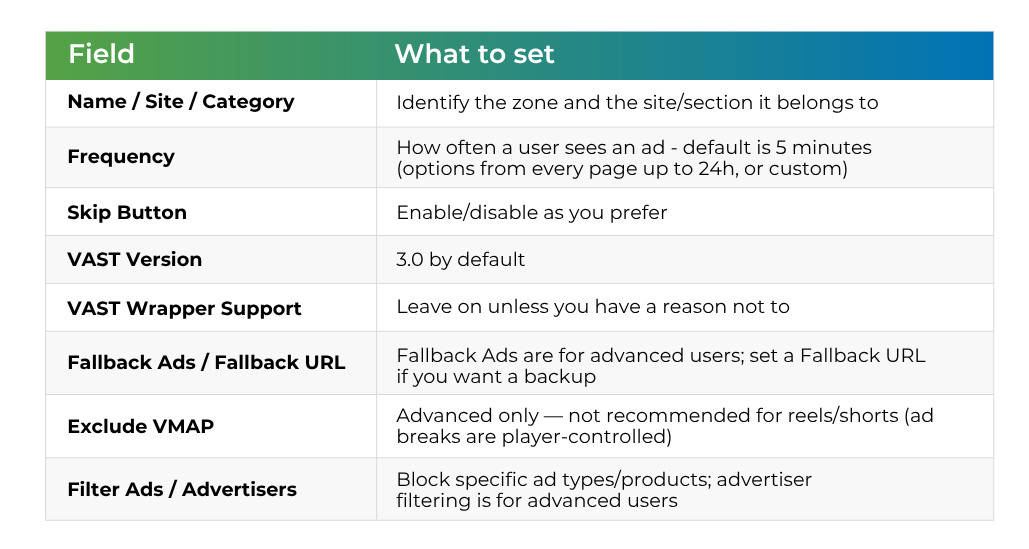
On save you receive a VAST tag URL. Hand that to your video player — ExoClick does not render the ad, your player does. If no eligible campaign is available, the zone simply returns a no-fill response, exactly like other Video (VAST) zones.
See our Vertical Video documentation here.
Vertical Video best practices for Publishers
Match the surrounding behaviour: Let the ad use the same swipe/scroll navigation as your organic clips, Place the title exactly as any other video in the feed.
Autoplay muted when in view: Begin playback when roughly half the ad is visible; pause when it scrolls out of view; resume when it returns.
Swipeable from 0 seconds: Loop the ad until swipe. The end user can move on at any time, and the ad loops while it stays in view.
Vertical video organic content: Ensure the feed contains at least 20 organic video items before enabling the ad format, performance drops significantly with thinner feeds.
Ad insertion: We recommend that you insert the ad between two organic videos, never at the top or bottom of the feed.
Set cache and replay on scroll-back: This will ensure that when an end user scrolls back, previously served ads will be displayed again. This saves firing a new VAST request avoiding unnecessary ad calls and protecting ad fill rate.
Frequency Capping: 5 minutes is the default and a good starting point, we recommend you experiment with this to find the sweet spot. For example show an ad every 4 to 8 videos, depending on the end user experience you prefer.
Do not use VMAP: VMAP is not supported on this zone type, because Reels-style environments handle ad breaks at the player/platform level.
Use the fallback URL chain: If ad fill is a concern, especially in early rollout phases when campaign volume may be lower, use fall back to ensure ads are shown.
No vertical content yet?
You don’t need a huge library to start — you need a feed structure. If your site doesn’t have a reels/shorties section yet, talk to your ExoClick account manager: several publishers are building theirs specifically to run this format, and we can advise on layout and on sourcing organic vertical content. A special test deal may be available to get you started.
The future of mobile video advertising
As vertical video content and short-form video continues to influence how users discover and interact with content, vertical ad formats are becoming an increasingly important part of the digital advertising landscape.
ExoClick’s Vertical Video format is built to help Publishers adapt to this shift by providing a modern video solution designed around mobile behaviour, engagement, and performance.
Start testing Vertical Video ad zones with ExoClick and explore a new way to monetize mobile audiences.
