

Looking to boost revenue from your existing mobile traffic without cluttering your webpages? Short-form content continues to build momentum, with over 60% of end users watching short-form content daily (opens in a new tab) across social media platforms.
To help publishers capture this high-engagement audience, ExoClick launched the Vertical Video ad format. In this case study, we explore how three different mobile publishers increased their site impressions and overall ad revenue by monetizing vertical video feeds.
What is a Vertical Video Ad Format?
The Vertical Video ad format is a version of In-Stream video. It serves a full-screen 9:16 ad directly between organic vertical videos that are intended to be shown on an end user’s mobile feed. Designed specifically for vertical browsing, it autoplays, loops, and allows end users to swipe away instantly. It aligns with the look and feel of short-form content we see daily on social media, making it intuitive for the end user.
While providing a great user experience, Publishers maintain total player control through a simple VAST tag URL. Setup requires no extra development time: playback, UI, mute states, and interaction logic remain fully under your control.
Publisher Case Studies: Scaling In-Stream Yield
To measure the impact of Vertical Video, three mobile Publishers integrated the 9:16 format into their short-form video carousels and feeds. Here is how adding a Vertical Video ad zone impacted their overall site impressions and revenue.
Publisher 1
Implementation: Integrated 9:16 Vertical Video VAST (opens in a new tab) ads into their mobile vertical content (mid-feed).
Results:
+6% overall revenue increase from In-stream inventory.
+4% impression growth across In-stream placements.
Publisher 2
Implementation: Monetized high-traffic mobile clip carousels using Frequency Capping of one ad per four organic videos.
Results:
+3% overall revenue increase from In-stream inventory.
+14% impression surge driven by improved video completion and viewability.
Publisher 3
Implementation: When ExoClick released vertical video, this Publisher built a dedicated section on site designed specifically to use the 9:16 vertical video feed ad format.
Results:
+19% overall revenue increase from In-stream inventory.
+33% impression surge driven by improved video completion and viewability.
Performance Summary
| Metric / Outcome | Publisher 1 | Publisher 2 | Publisher 3 |
| Primary Placement | Mobile Vertical Feed | Mobile Clip Carousel | Dedicated 9:16 Short-Form Feed |
| Revenue Impact | +6% In-Stream Revenue | +3% In-Stream Revenue | +19% In-Stream Revenue |
| Impression Growth | +4% In-Stream Impressions | +14% In-Stream Impressions | +33% In-Stream impressions |
How to Set Up Vertical Video Section on Websites
To achieve optimal viewability, CTR, and yield, follow these implementation steps and recommended zone settings.
1. Requirements Before You Begin
Your website or mobile web app must feature a dedicated section with a 9:16 carousel or feed of short-form videos.
Ensure the feed contains at least 20 organic video clips before enabling ad rotation to maintain high user engagement.
2. Creating the Zone in Admin Panel
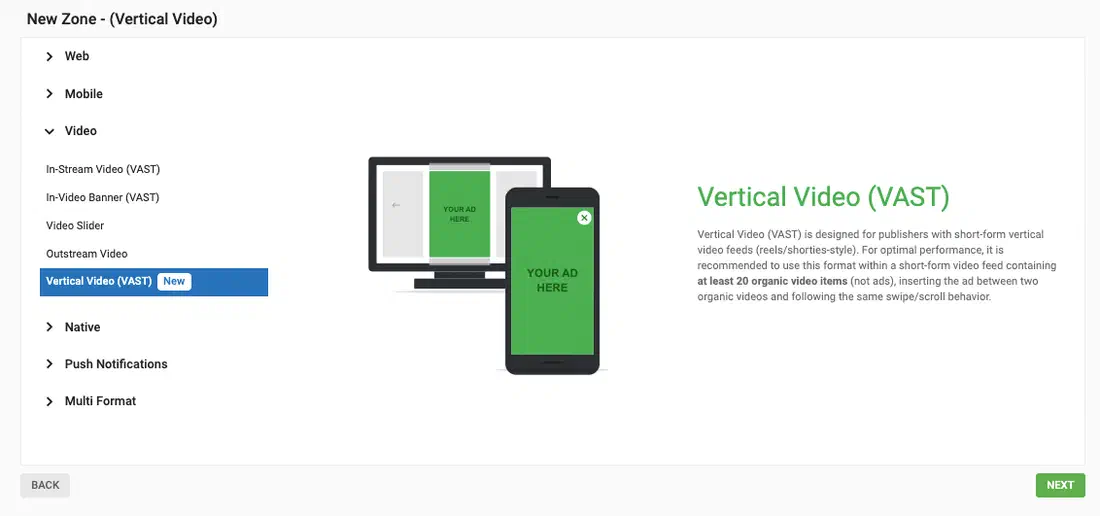
Navigate to Sites > Zones > Vertical Video (under the video category) and apply these settings:
Open Sites & Zones: Click New Zone and select your target website property.
Select Format: Choose Video -> Vertical Video (VAST) (this mirrors standard In-stream VAST configuration).
Get VAST Tag: Save your zone and copy the generated VAST Tag URL.
How to Optimize the Vertical Video Ad Zone for the Best Results
Configure Frequency Capping: Select Custom and set to 0 minutes in the Admin Panel settings. This will ensure you are not overloading the end user with ads.
Configure Skip Button: Select Disable in the Admin Panel settings for the ads on your vertical video feed. This will allow end users to swipe automatically past an ad like they would on organic content.
Inline Placement Only: Always insert ads between organic video clips. This integrates them into the end user’s experience and reduces friction. Placing them at the very top or bottom of a feed may affect viewability and overall zone performance.
How to Adapt Horizontal Content to Vertical Video Content
Even without original vertical assets, you can repurpose existing horizontal (16:9) long-form content into punchy 9:16 vertical stories.
Follow these steps to adapt your horizontal video content effectively:
Start with raw footage: Working from unedited video gives you full control without baked-in overlays or sound conflicts.
Keep it short and punchy: Select the best moments to build 15–30 second clips, or split one long video into multiple vertical parts. Maintain a fast pace with a cut or visual change every 2–3 seconds.
Reframe the focus: Keep the main action centered using auto-reframe tools in Adobe Premiere, CapCut, or DaVinci Resolve. For wide shots where cropping fails, place the video centered with blurred top and bottom borders.
Optimize for mobile screens: Design for sound-off viewing using visual context or captions. Keep text minimal, non-intrusive, and within safe visual boundaries.
Build compilations: Combine short highlight clips of top personalities or popular categories into top-5 lists to build an engaging vertical library.
Conclusion: Scaling Your Business
Adapting your ad inventory to modern mobile browsing habits unlocks higher-value advertiser budgets and significantly increases overall site yield without compromising user experience. Transitioning to 9:16 vertical video placements provides publishers with a future-proof, high-eCPM monetization strategy aligned directly with market demand.
Sign up as an ExoClick Publisher (opens in a new tab) to start monetizing your mobile feeds. Already working with us? Reach out to your Account Manager or the Customer Success Team for tailored advice on optimal zone placements for your site layout.