Ad blocking continues to negatively affect publisher revenues, ExoClick provides a free solution to publisher clients called Neverblock (opens in a new tab) which circumvents ad blockers and still shows publishers ads. But we also have a second option that Publishers can try based around forcing popunders to show even if the end user is using an adblocker. It’s called our in-line popunder code and is very easy to implement in the <body> tags on a publisher’s website.
Let’s look at three publishers who implemented our in-line code and the results it achieved for their revenues.
Case study 1
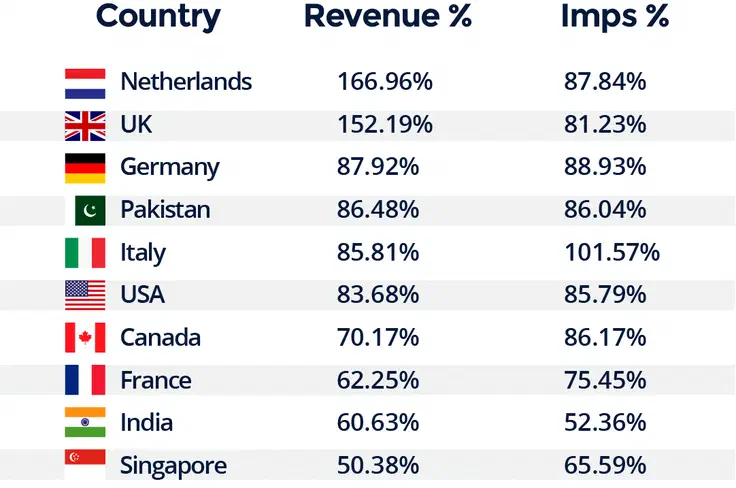
“I have 8 websites, so I tested the in-line popunder code on my biggest site first of all. I was earning $4,524 a month from popunders, then I added the in-line code and in the first month my earnings had increased to $6,520 a month, that’s an increase of 44%. Now I have added it to all 8 of my websites and the average daily revenue increase is 32.5% and an impressions increase of 56.29%”
Looking at this publishers top 10 GEOs both revenues and impressions increased in all 10 GEOs:
Case study 2
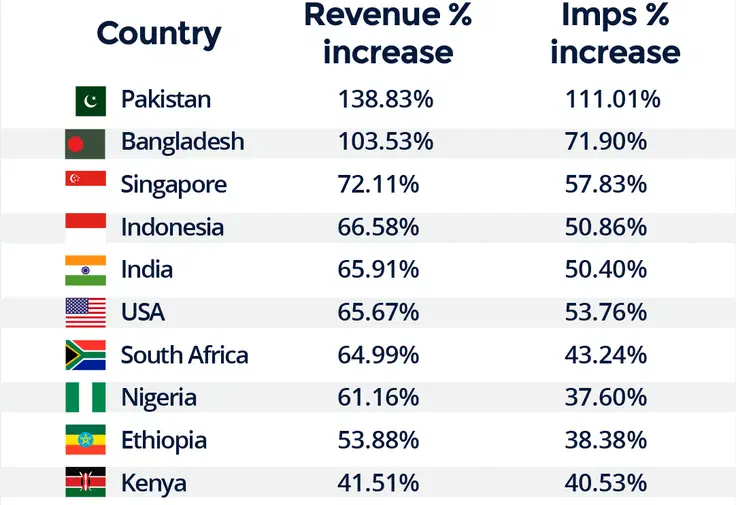
“I tried implementing the in-line code on a mobile popunder zone, I was making around $5,170 each month before I added the inline code, now I am monetizing both standard and ad block users and the ad zone is generating $11,254, an increase of 117.6%, am my impressions for the ad zone increased 60% from 200k to 330k a day.”
Looking at this publishers top 10 GEOs both revenues and impressions increased in all 10 GEOs:
Case study 3
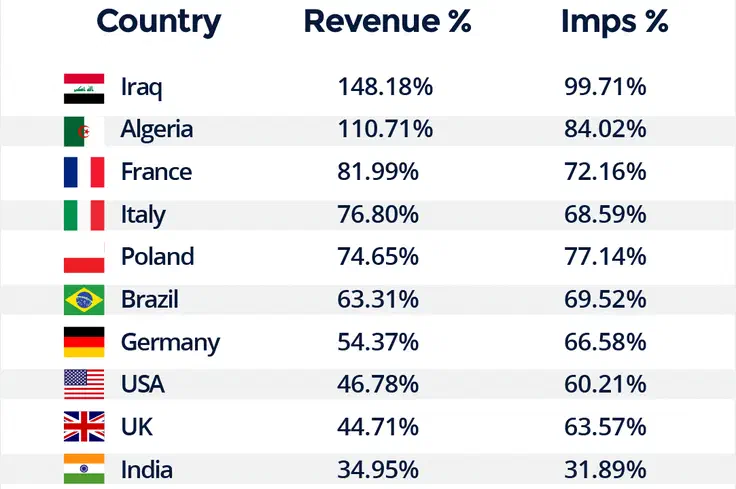
“With India being my number 1 GEO I was interested to see if introducing the in-line code would make much difference as adblock software isn’t really used that much by this user group. I was really surprised to see an increase of 12% in revenues. My popunder ad zone was making an average of $11k per month, with the in-line code this has boosted my monthly earnings to $12.3k and impressions increased by 62%.”
Looking at this publishers top 10 GEOs both revenues and impressions increased in all 10 GEOs:
In-line code tutorial
Step 1
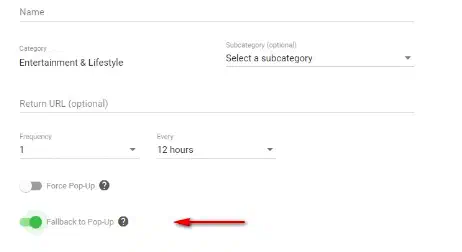
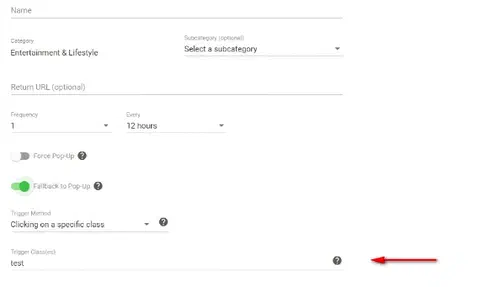
Under Sites and Zones select Popunder. By default the in-line code is switched off, so to enable it you will see that there are two options:
- Force Pop-Up – Select this option to force the ad to trigger as a Pop-Up on all browsers, including Chrome at all times.
- Fallback Pop-Up – Select this option to force the ad to trigger as a Pop-Up ONLY on Chrome at all times. This option will not work on other browsers.
Toggle on one of the options. In this example we have selected Fallback to Pop-Up.
Step 2
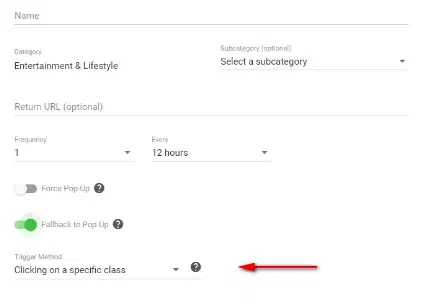
Under Trigger Method select the ‘Click on a specific class’ option. This ensures that the ad will only trigger when a user clicks on an image on your website and not on any blank space, this is one of the rules regarding the popunder.
Step 3
In the Trigger Class field add a class name that you will use in your script and also in your web page to make the pop trigger. (“test” in this example)
Within your website’s page the HTML structure of the class set up should look like this:
<a class=“test" hrfer=“path_to_a_video_page”>
<img src=“path_to_an_image”/>
</a>
Where the link tag <a> includes the class “test” and contains an <img> tag. This will make the pop trigger on these specific elements but not on other sections of the page such as white spaces, other text links, etc.
Please note: You cannot include any spaces within the class code line e.g. ‘thumb nail’ the system won’t accept it. However dashes (“-”) are accepted, eg: “thumb-nail”. Additionally, remember that multiple classes are allowed as long as they are separated by commas: test, thumb-nail, etc.
Step 4
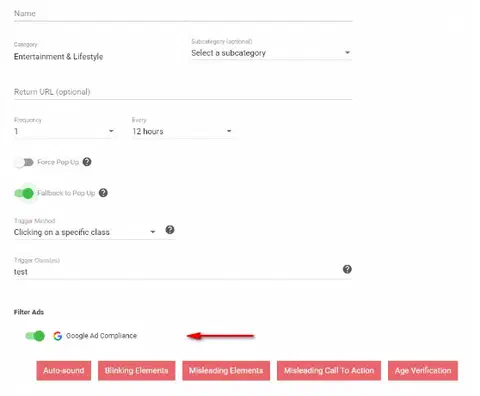
Toggle on the Google Ad Compliance switch:
Step 5
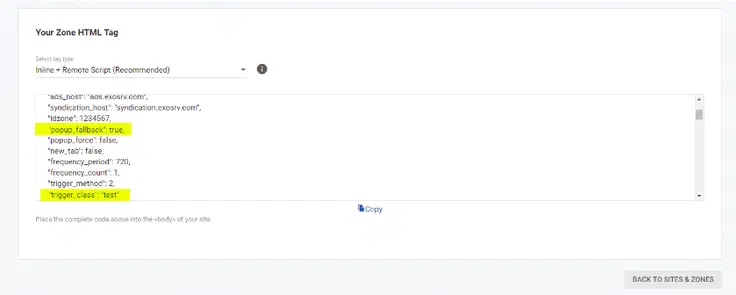
Here is a screenshot example of the Popunder code that will be generated, so that you can cut and paste the script within the <body> tag of website.
It’s that simple to start increasing impressions and revenues for your popunders.